
 400-660-8680


简化终端设备管�
全�管控PC计算机�智能手机以�平�电脑,确�网络安全
Applications Manager支æŒ�监控Novellæœ�务器,自动监测故障问题并进行修å¤�,ä¿�è¯�Novellæœ�务器æ£å¸¸è¿�行,并å�¯ä»¥ç”Ÿæˆ�å…¨é�¢çš„报表。
By monitoring the CPU Monitoring capability of Novell servers, you can monitor CPU usage - check if CPUs are running at full capacity or if they are being under utilized. By monitoring server CPU utilization, you can monitor server performance and restart a process or an application to improve the response time of the application.
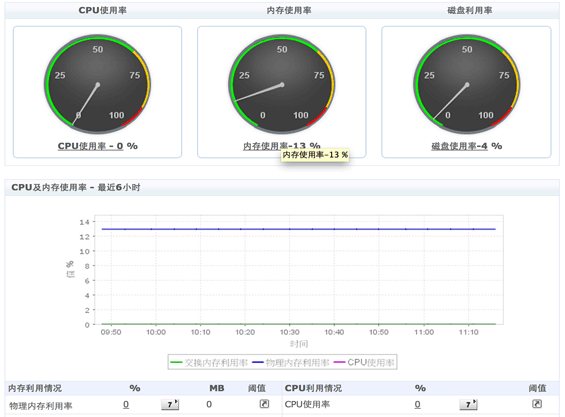
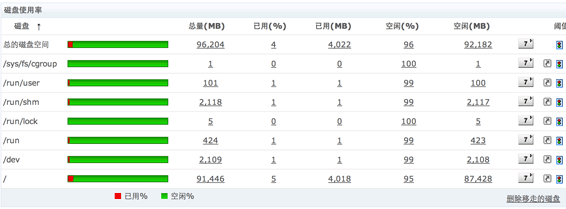
Monitor the hard disk space utilized by the system and ensure critical processes on the server have sufficient system resources. This helps you maintain a margin of the available disk space. You will be notified when the disk space falls below the margin. You can also run your own programs/scripts to clear disk clutter when thresholds are crossed.
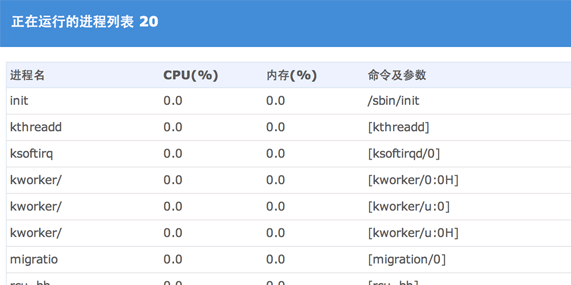
Monitor and report on System Processes. Monitor memory, CPU Utilization of processes. This helps identify Top 10 or Top 'N' System Processes or Server Applications using high Server Resources.
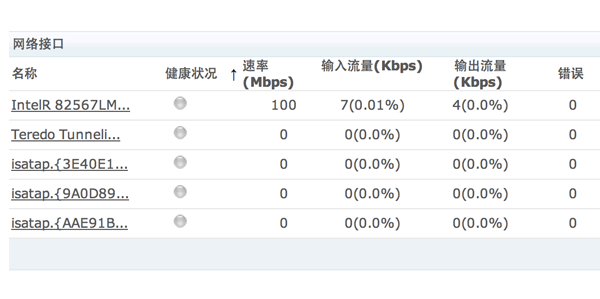
Monitor Network Interface traffic on the server and understand how much network load it handles.
更多信�,请�考:Novell 的在线帮助.



